Short Answer
We ran the 55 public Sigma detection rules for AWS CloudTrail against a month of CloudTrail from our own AWS account. For each rule we measured what it looks at, and added it up into one number we call the rule-read share: the part of a log source's bytes that at least one detection rule reads.
The answer depended on how we counted. Most rules look for specific actions, and the events they care about were about 2% of the data. Four broad rules check every event for who did something or with what tool, so counted by event, the rules needed all of it. Inside each event, though, the rules used only a few fields, about 18% of the bytes.
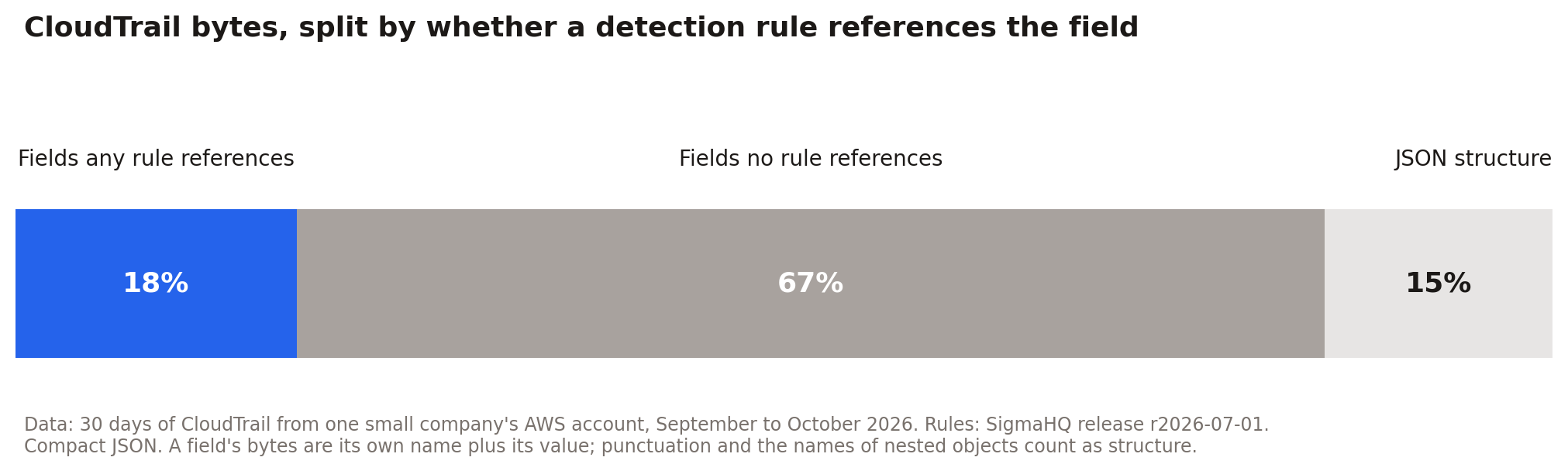 Figure - 1
For log reduction, this means cutting CloudTrail by event type would blind those four rules. Cutting by field, with the full record kept in cheaper storage for investigations, would not. Your numbers will differ from ours, but the way to find them is the same.
Why We Measured This
In conversations about SIEM costs, one worry comes up again and again: if we cut some of this data, which detections do we lose? A customer put it to us after finding thousands of rules that had not raised an alert in six months. They could not tell whether the events were rare or the rules had stopped working, and without that answer, nobody wanted to delete anything.
Answering it requires knowing what each rule reads. We didn't have the customer's data, so we measured our own.
Two Terms: Reading and Rule-Read Share
A rule reads an event when the event falls within what the rule looks at, for example every console login. It reads every event in that scope, whether or not it raises an alert. Think of a guard checking badges at a door: the guard looks at everyone, even though almost nobody sets off an alarm. Reading decides which data a rule needs to have. Matching is what produces alerts.
Rule-read share is the part of a log source that at least one rule reads. We measured it two ways: by event (does any rule look at this kind of event at all?) and by field (inside those events, which pieces does any rule use?). In The Noise Tax, we described the noise tax as paying SIEM prices for data that no rule reads and that no investigation or compliance need keeps in the SIEM. Rule-read share measures the first part of that.
What We Tested
We took the 55 CloudTrail rules from SigmaHQ, the largest public collection of detection rules, and a month of CloudTrail from our own AWS account. CloudTrail records every call made to AWS. In our account most of those calls come from software, not people: 87% of the bytes were read-only calls that look something up without changing anything. We also ran every event through the rules to see what they matched. The technical details are in the methodology section at the end.
Finding 1: Most Rules Had Nothing to Look At
Thirty-eight of the 55 rules had nothing to read all month. They watch for rare, serious actions, such as someone turning off logging or deleting a threat detection setup, and none of those happened. Seventeen rules had events to look at, and only eight of them ever matched.
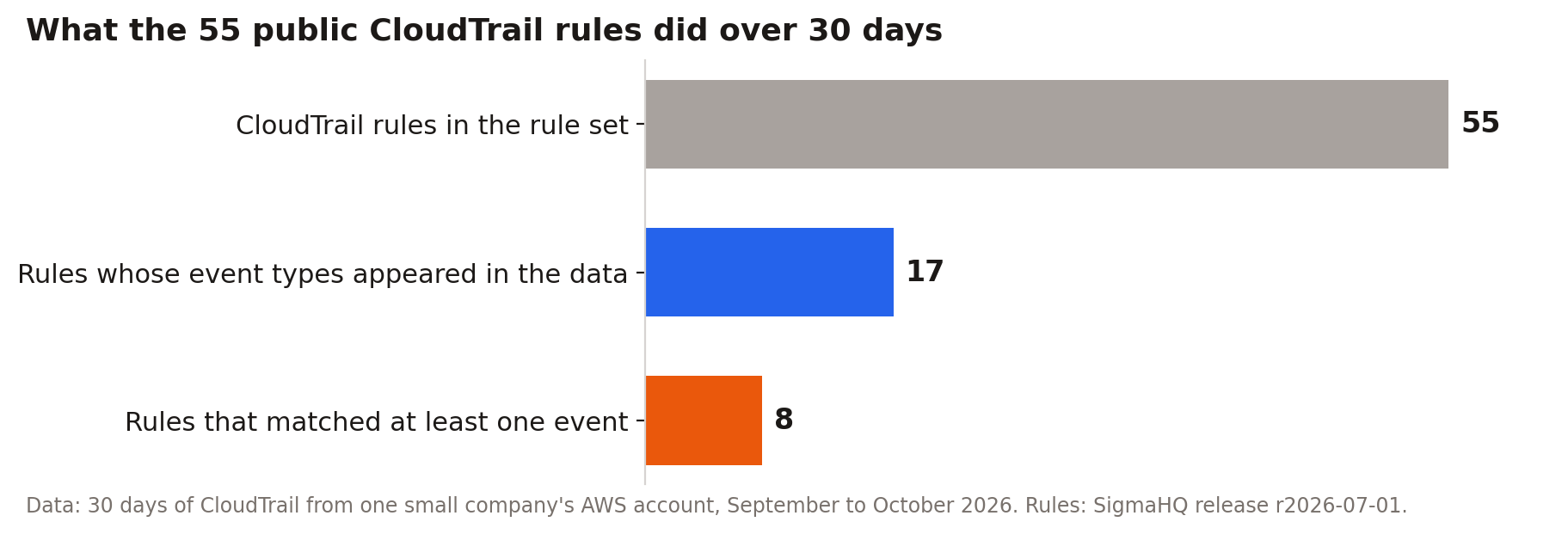 Figure - 2
A silent rule is not necessarily a broken one. Here we could confirm, rule by rule, that the action each one waits for never happened, because we had the rules and the data side by side. Without that comparison, there is no way to tell the two apart.
Finding 2: A Few Broad Rules Read Every Event
Most rules are written for one specific action, such as a particular API call. The events those rules care about added up to about 2% of our CloudTrail bytes.
Four rules work differently. They don't care which action was taken; they check who took it or with what tool, such as whether the root account was used or whether a known credential-scanning tool made the call. To do that, they have to look at every event.
![Figure 3. CloudTrail bytes by service group, and the part any rule is written for]](https://assets.fleak.ai/pasted-image-2.png) Figure - 3
Figure - 3
Figure 3 groups the data by AWS service. The blue slivers are the events a specific rule is written for; everything gray is read only by the four broad rules. Counted by event, the rule-read share was 100% with those four rules and about 2% without them.
This is why a common log reduction idea, keeping only the event types your rules care about, does not work for CloudTrail. The four broad rules would lose almost all of their input.
Finding 3: Rules Use About 18% of Each Record
The broad rules read every event but look at only a few details in each one: who made the call, what kind of identity it was and what software made it. Across all 55 rules, the fields any rule uses came to 18% of the bytes, which is the rule-read share counted by field. Another 67% was details no rule uses, like session tokens, request IDs and the parameters of each request, and 15% was the formatting of the records themselves (Figure 1).
That 67% is not waste. When an alert fires, an analyst uses exactly those details to work out what happened. What the number shows is that detection needs much less of each record than the SIEM stores, so the rest can live somewhere cheaper as long as investigators can still search it.
Finding 4: One Noisy Rule Can Undo the Savings
When we ran the rules, one of them, a low-severity rule called AWS STS AssumeRole Misuse, matched about half of all events. It flags any action taken through an assumed role, which in a cloud account like ours describes most of what our software does, and its own documentation warns that automation will trigger it. The other 54 rules together matched about one event in 15,000.
A rule this broad works more like a hunting query, something an analyst runs on purpose, than an alert. Run as an alert, it floods the queue. And if only matches are sent to the SIEM, it sends half the data back.
Finding 5: Where Rules Run Decides What the SIEM Must Hold
A rule needs its data wherever it runs. If every rule runs in the SIEM, the four broad rules alone mean all of CloudTrail has to be there. Rules can also run earlier, in the data pipeline that carries logs to the SIEM. There they read every event as it passes, and only the matches have to go on to the SIEM.
We replayed the month this way. With all 55 rules in the pipeline, the matches came to 46% of the bytes. Without the noisy rule, they came to about 0.01%.
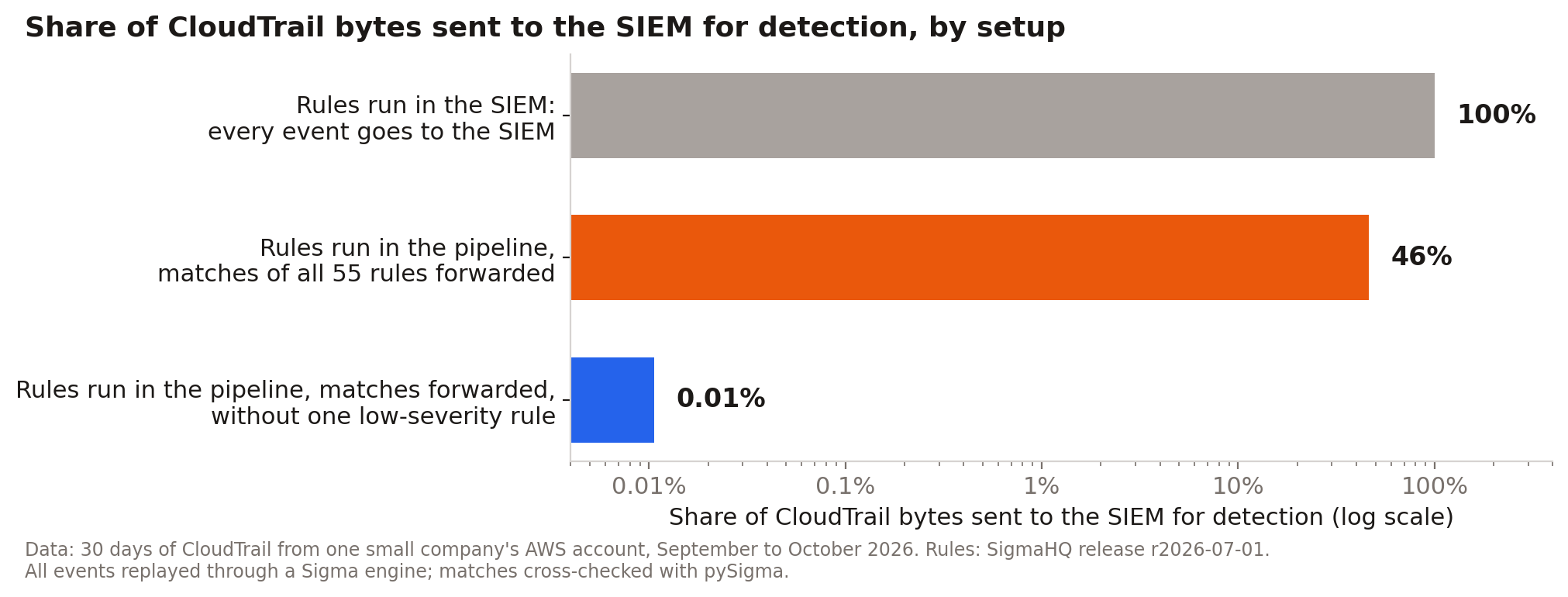 Figure - 4
These figures count only what detection needs. The events that didn't match still have to be kept somewhere investigators can search, and the detections built into a SIEM need data too.
Running rules in a pipeline has its own costs. Rules that look for patterns over time are harder to run on streaming data. A new rule can't see the past unless you replay stored data through it. The pipeline is one more system to run and pay for, and many SIEMs have filtering and storage tiers that cover part of the same ground.
Lessons for Log Reduction
We measured only CloudTrail, and the numbers belong to our account. The lessons below are what we would apply to any log source before reducing it.
- Start from the rules, not the logs. Volume tells you where the money goes. Only the rules tell you which data detection needs. Measure the rule-read share before you cut anything.
- Find the broad rules first. A handful of rules that check every event decide whether you can filter by event type at all. If a source has them, filtering by event will blind them.
- Reduce by field before you reduce by event. Even rules that read every event use a small part of each one. Trimming the fields no rule uses, while keeping the full record in cheaper storage, cuts volume without blinding any rule.
- Route before you delete. Data that detection doesn't need may still be needed by investigators or auditors. Move it to cheaper storage they can search, and delete only what nobody needs.
- Fix noisy rules before you count savings. One overly broad rule can make almost everything look necessary and flood the alert queue at the same time.
- Decide where each rule runs. Rules that look at one event at a time can run in the pipeline and send only their matches to the SIEM. Rules that need history or context may be better left in the SIEM.
- Check that silent rules have data. A rule with no input looks the same as a rule waiting for something rare.
- Measure again when rules change, and make it someone's job. New rules change which data is needed.
What This Does Not Mean
None of this says CloudTrail can't be reduced. It says the obvious approach, keeping only the event types your rules name, breaks the rules that watch everything. What our data supports is reducing by field, running the broad rules before the data reaches the SIEM, and keeping the full record in cheaper storage that investigators can search.
The numbers have limits too. We tested public rules; the rules your team runs may differ and may include more broad rules, or none. Our account is small and mostly automated, and an account with more people signing in will look different. A rule that reads data without ever matching doesn't prove the data gives useful coverage, and the replay shows that the rules ran as written; it says nothing about whether they are good detections.
How to Measure Rule-Read Share in Your SIEM
- List the rules you run. For each one, note the log source, the kinds of events it filters on and the fields it checks, and mark the broad rules.
- Measure your log volume by event type and by field for a few weeks.
- Compare the two. The event types and fields no rule reads are your candidates for cheaper storage.
- Replay the same weeks through your rules and count matches per rule, to find the noisy rules and the silent ones.
We did step 4 with the Sigma detection node in Fleak and checked the results with pySigma, an open-source Sigma library.
Methodology
We used the 55 CloudTrail rules in SigmaHQ release r2026-07-01 and 30 days of CloudTrail from our own AWS account, from September and early October 2026. For each rule we worked out which event types and fields it reads, then measured the bytes those event types and fields take up, counting each record at its size as compact JSON. A field's bytes are its own name plus its value; punctuation and the names of nested objects count as structure.
Two rules show how the counting works. AWS STS GetCallerIdentity Enumeration Via TruffleHog filters on eventSource and eventName, so it reads every GetCallerIdentity call, about 2% of our CloudTrail bytes. Its only other condition is on userAgent, and the three fields it references made up about 6% of the bytes in those events. AWS Root Credentials has no condition on the API call. It checks userIdentity.type, with an exception based on eventType, so it reads every event, and those two fields came to about 2% of all CloudTrail bytes.
If any part of a rule's condition doesn't filter on the API call, we counted the rule as reading every event. Figure 5 shows how much the event-level result depends on which rules are counted. One of the four broad rules uses a negative condition that covers almost every event type, so leaving out only the other three keeps the share near 100%.
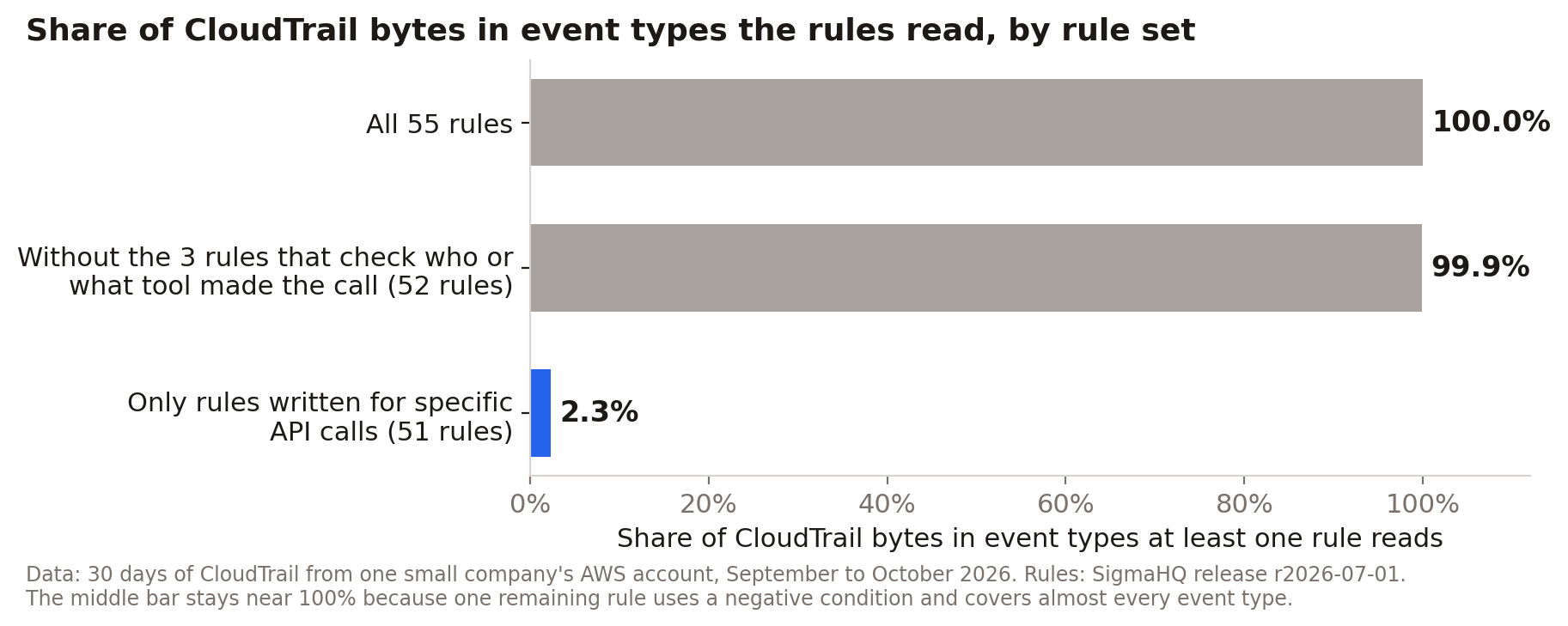 Figure - 5
Figure 6 shows the field-level share within each AWS service group, measured against that group's own bytes. Identity and roles has the lowest share, 9%, because most of each AssumeRole event is the temporary credentials the call returns.
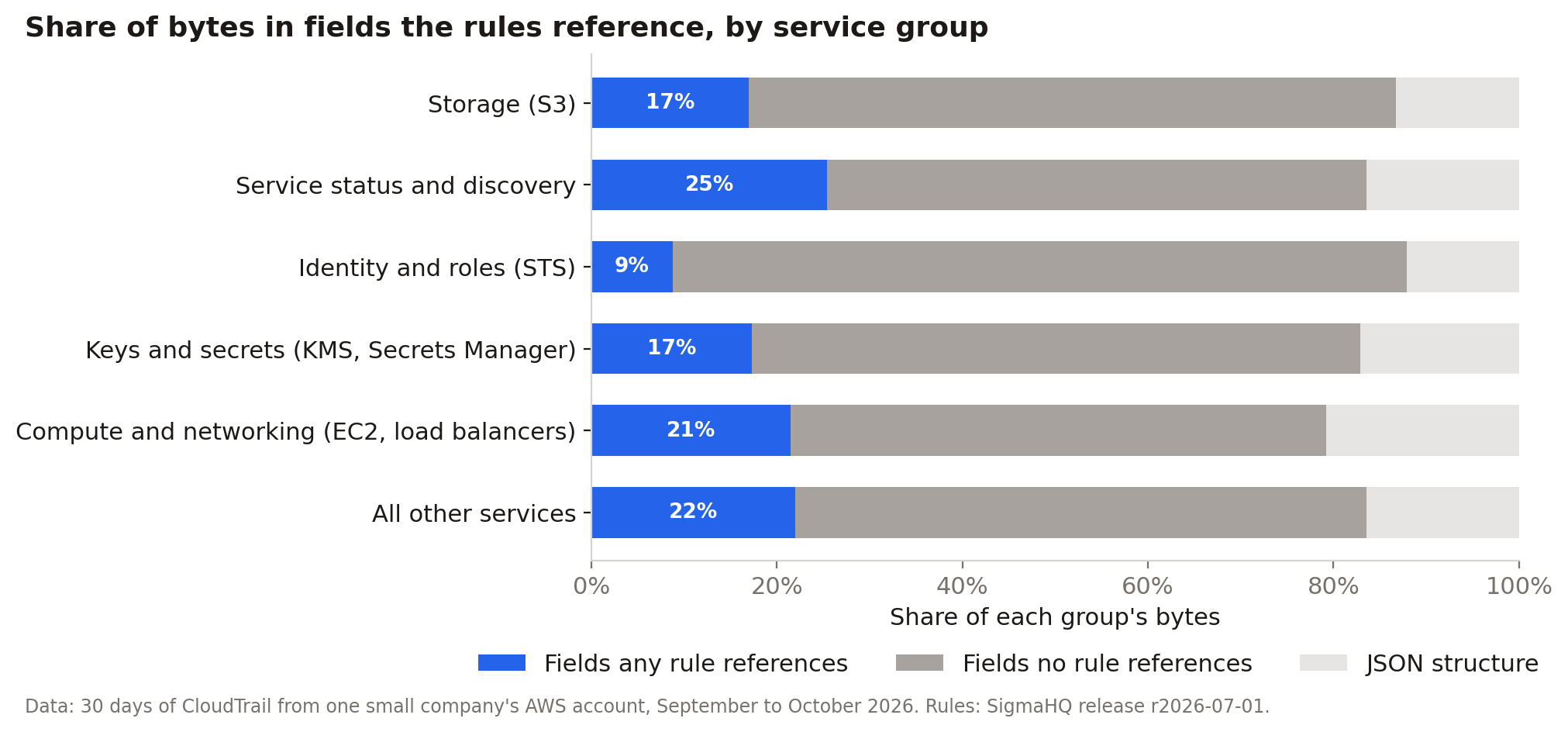 Figure - 6
Every event also went through the Sigma detection node in the Fleak pipeline, and we counted matches per rule. We checked every rule-and-event decision against pySigma with its SQLite backend. For the 54 rules pySigma could convert, the two agreed on every event; the 55th had no candidate events that month.
Related Reading
- The Noise Tax: Why Most SIEM Spend Goes to Data That Never Triggers a Detection defines the noise tax used in this post.
- How to Explain SIEM Costs to Your CFO Without Losing the Security Budget covers pulling volume by source and presenting it to finance.
See what your SIEM bill could look like
Answer three questions and get an estimated reduction for your log volume.