How do you reduce Microsoft Sentinel ingestion costs?
Short answer: To reduce Microsoft Sentinel ingestion costs, send less low-value data to the analytics tier. Filter and transform logs before or at ingestion, route secondary logs to the Sentinel data lake tier, claim every free data source you're entitled to, and move to a commitment tier once your daily volume is predictable. Most teams find their biggest savings in the first two steps.
Sentinel cost reduction is mostly a data problem, not a licensing one. You pay per GB, so the question to ask about every log source is simple: does this data need to be searchable in real time for detections, or does it just need to be kept?
Why are Microsoft Sentinel ingestion costs so high?
Sentinel bills mainly on how many gigabytes you ingest into the analytics tier, the "hot" tier where detection rules, hunting queries and workbooks run. In the US, pay-as-you-go analytics ingestion runs about $4.30 to $5.59 per GB depending on region (Security Boulevard). With large data volumes, that becomes a hefty bill.
The bill tends to creep up for a few predictable reasons:
- Verbose sources. Firewalls, proxies, DNS, NetFlow and Windows Security Events produce huge volumes, and much of it is routine traffic that never triggers a detection.
- Everything lands in the same tier. By default, data goes to analytics tables whether you query it daily or once a year for an audit.
- Redundant fields. Raw logs often carry duplicate timestamps, empty columns and long text fields that add size without adding detection value.
- Non-security data in a Sentinel workspace. Sentinel charges for all data in a Sentinel-enabled workspace, including operational logs that belong somewhere else (Microsoft Learn).
- Volume spikes. A misconfigured agent or a noisy new connector can double daily ingestion before anyone notices.
8 Sentinel cost reduction strategies that work
- Filter low-value events before they're ingested. Drop health checks,
allowedinternal traffic, debug-level messages and duplicate events. Every GB you filter out is a GB you never pay analytics rates for. - Trim fields with ingestion-time transformations. Transformations are KQL queries inside a data collection rule (DCR) that run on data before it's stored. They can remove rows, drop unused columns or mask sensitive values. With Sentinel enabled, transformations into analytics tables aren't subject to the filtering charge, no matter how much they drop (Microsoft Learn).
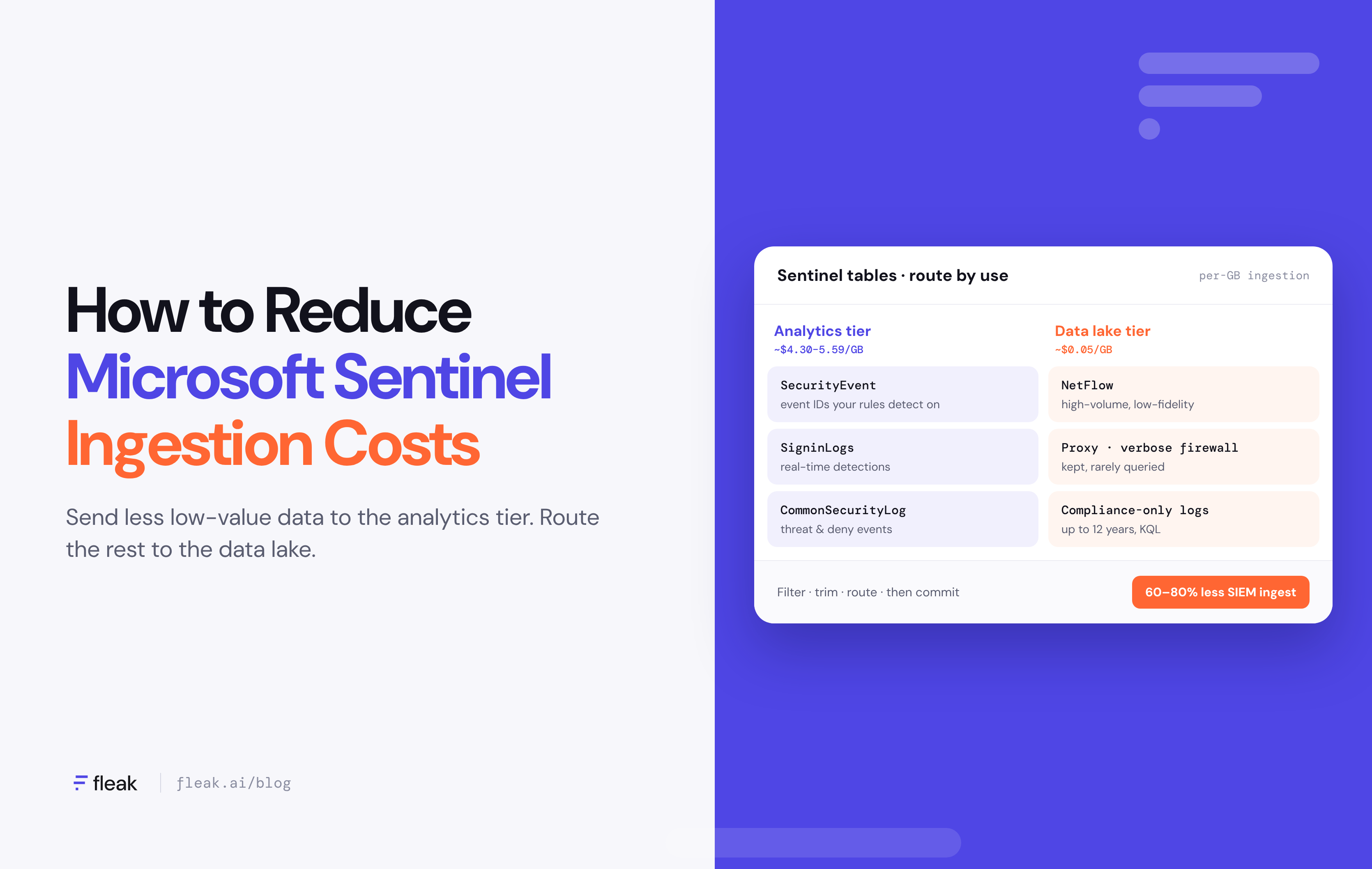
- Route secondary logs to the Sentinel data lake tier. Keep detection-critical data in analytics and send high-volume, low-fidelity data (NetFlow, verbose firewall, proxy logs) to the data lake. Data lake ingestion is reported at about $0.05 per GB, roughly 1% of analytics pricing (Security Boulevard). You can still query it with KQL and run scheduled jobs on it.
- Use filter and split rules. Sentinel's filter and split transformations let you send part of a table to analytics and the rest to the data lake, set up from the table management page in the Defender portal without writing a DCR.
- Claim your free data sources. Azure Activity logs, Office 365 audit logs and Microsoft Defender XDR alerts are ingested free. Microsoft 365 E5 customers get up to 5 MB per user per day for eligible logs, and Defender for Servers Plan 2 includes 500 MB per server per day for tables like SecurityEvent.
- Move to a commitment tier. Commitment tiers start at 100 GB a day and save up to 52% versus pay-as-you-go (Microsoft). You can move up anytime but must wait 31 days to move down, so size it after you've cut volume, not before.
- Filter Windows Security Events at the source. The Azure Monitor Agent supports the Minimal or Common event sets, or custom XPath filters, so only the event IDs you actually detect on get collected.
- Shorten analytics retention. Analytics retention defaults to 90 days. Older data can sit in lower-cost long-term retention and still be queried through the data lake when you need it.
Why filtering before ingestion matters most
The cheapest GB is the one that never reaches Sentinel. DCR transformations and split rules help, but they only work on data that's already flowing into Azure, and they're limited to KQL on a table-by-table basis. For third-party sources like firewalls, cloud platforms and SaaS apps, many teams add a security data pipeline in front of Sentinel.
A pipeline sits between your log sources and your SIEM and does four jobs:
- Filter: drop events with no detection or compliance value.
- Normalize: map fields to a common schema (such as ASIM, the Advanced Security Information Model Sentinel uses) so detections and cross-source correlation work reliably.
- Enrich: add context like asset owner, geo or threat intel, so analysts get more out of fewer events.
- Route: send detection-ready data to the analytics tier and everything else to the data lake or low-cost storage.
Fleak is an example of this approach. It sits in front of Microsoft Sentinel rather than replacing it. It filters and deduplicates low-value events, normalizes logs to schemas like OCSF in real time, and routes each event to Sentinel, a data lake or an archive based on what it's needed for.
Pipelines are built from plain-English descriptions, and when a source's schema changes, Fleak detects the drift and generates a corrected config in minutes. Our customers have reported a 60–80% reduction in SIEM ingest.
This is also where the cost problem and the detection-quality problem meet. Cleaner, well-labeled data costs less to store and is easier for both analysts and AI-assisted tools to use. In practice, it's less about collecting less and more about collecting the right data in the right shape.
Sentinel analytics tier vs. data lake tier
Use the analytics tier for data that powers real-time detections and the data lake tier for everything you need to keep but rarely query.
|
|
Analytics tier |
Data lake tier |
|
Best for |
Detection rules, hunting, incident investigation |
High-volume logs, compliance, forensics, historical hunting |
|
Ingestion (US) |
~$4.30–5.59/GB pay-as-you-go |
~$0.05/GB, plus ~$0.10/GB processing |
|
Storage |
90 days included |
~$0.026/GB/month |
|
Querying |
Included |
~$0.005/GB scanned |
|
Retention |
90 days default, up to 2 years |
Up to 12 years |
|
Typical sources |
Entra ID sign-ins, EDR, identity, critical firewall denies |
NetFlow, DNS, proxy, verbose firewall allows, storage access logs |
Prices from Security Boulevard (May 2026); check the Microsoft Sentinel pricing page for your region.
How to audit and cut your Sentinel bill, step by step
1. Find your top tables by volume. Run this in your Log Analytics workspace to see which tables cost the most over the last 30 days:
Usage
| where TimeGenerated > ago(30d)
| where IsBillable == true
| summarize BillableGB = sum(Quantity) / 1000 by DataType| sort by BillableGB desc
2. Map each table to a use. For your top 10 tables, list which analytics rules, workbooks or hunting queries actually reference them. A table with heavy volume and no rules is your first candidate to move or filter.
3. Drill into event types. Within each high-volume table, break volume down by event ID, action or source host. Usually a handful of event types make up most of the volume.
4. Decide: keep, trim, route or drop. Keep detection-critical events in analytics, trim unused columns, route compliance-only data to the data lake and drop pure noise.
5. Apply the changes. Use DCR transformations, filter and split rules, or a security data pipeline like Fleak in front of Sentinel for third-party sources.
6. Re-size your commitment tier. Once volume stabilizes for a few weeks, pick the tier that matches your new daily average.
7. Set alerts for drift. Use Cost Management budget alerts and the Data Collection Health Monitoring workbook so a new noisy source doesn't quietly undo your work.
Common Sentinel cost reduction mistakes
- Dropping data you'll need later. Before filtering anything, check it against your detection rules and compliance requirements. Routing to the data lake is usually safer than deleting.
- Locking into a commitment tier too early. If you commit at 300 GB a day and then cut volume to 150 GB, you'll pay for the higher tier until the 31-day period ends.
- Breaking detections with transformations. Removing a column that an analytics rule depends on can silently stop that rule from firing. Test changes against your rule set first.
- Treating it as a one-time project. New connectors and app changes add volume over time. Review your top tables at least quarterly.
Sentinel cost reduction FAQ
How much can you save on Microsoft Sentinel?
It depends on your data mix, but filtering noise and routing high-volume logs to the data lake typically has the largest effect, since data lake ingestion is priced at a small fraction of analytics ingestion. Commitment tiers add up to 52% off whatever volume remains in analytics.
What is the cheapest way to store logs in Microsoft Sentinel?
The Sentinel data lake tier. It's built for long-term, high-volume storage, supports retention up to 12 years and can still be queried with KQL.
Does filtering data with DCR transformations cost extra?
Not for analytics tables in a Sentinel-enabled workspace. The filtering charge only applies to Basic tables when a transformation drops more than 50% of incoming data.
Which data sources are free in Microsoft Sentinel?
Azure Activity logs, Office 365 audit logs and Microsoft Defender XDR alerts are free to ingest. Microsoft 365 E5 and Defender for Servers Plan 2 customers also get daily data allowances.
When should you switch to a commitment tier?
When your daily analytics ingestion is consistently at or above 100 GB, and after you've finished filtering and routing. Downgrades require waiting out a 31-day commitment period.
Is the Auxiliary logs plan still the best low-cost option?
For most new deployments, the Sentinel data lake tier is now Microsoft's recommended home for lower-fidelity security data. Check your current table plans in the Defender portal before migrating.
Key takeaways
- Sentinel bills per GB, so Sentinel cost reduction starts with sending less low-value data to the analytics tier.
- Filter and normalize data before ingestion, and route secondary logs to the data lake tier.
- Claim free sources and E5 or Defender for Servers allowances.
- Size your commitment tier last, after volume has dropped.
- Revisit your top tables every quarter.
Not sure where your Sentinel spend is going?
See which sources drive your ingestion costs and how much you could filter or reroute before it reaches Sentinel.