The short answer
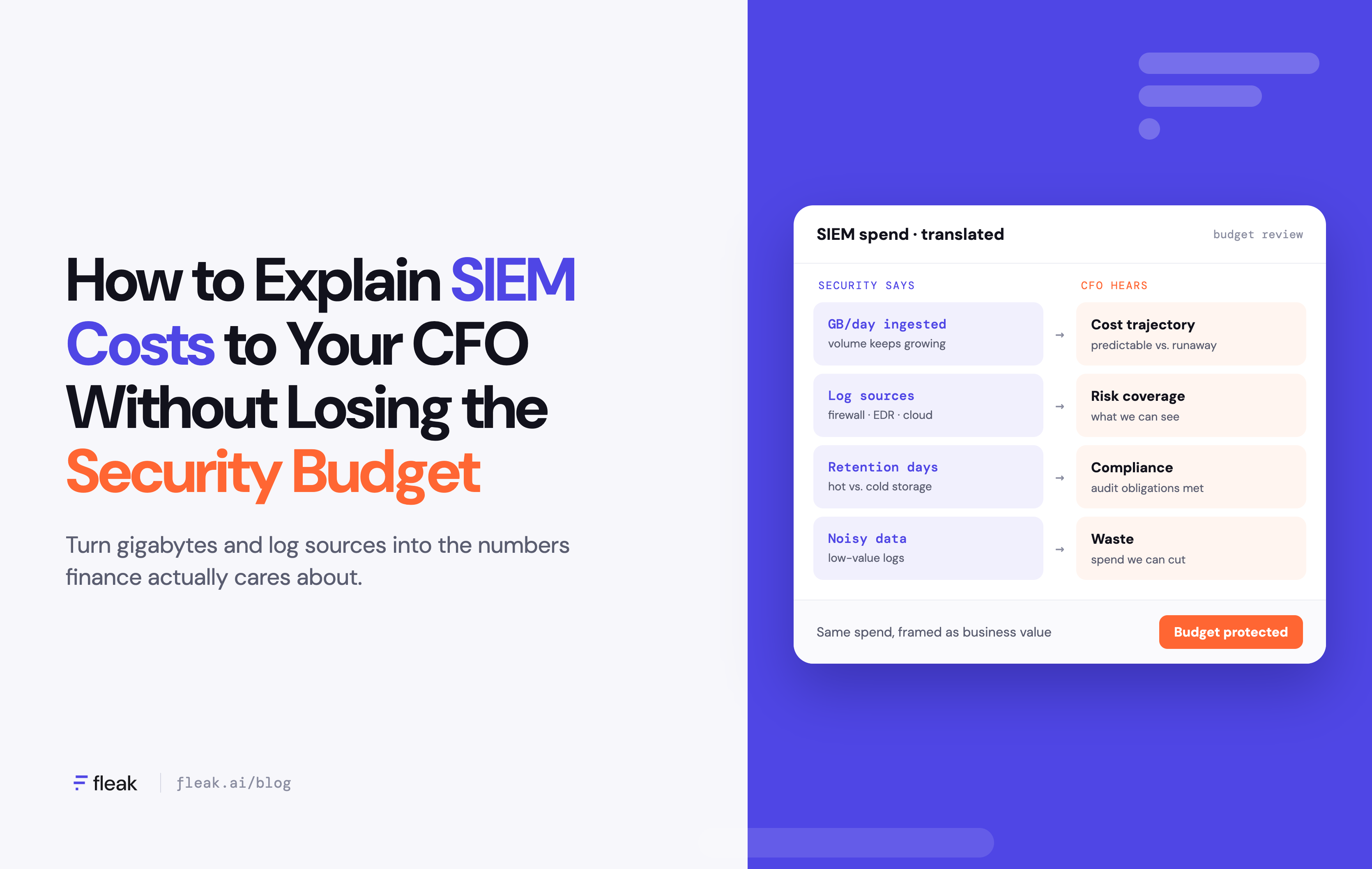
To justify your security budget to a CFO, stop describing SIEM spend as a price per gigabyte and describe it as a price per result. In the meeting, show the waste you have already removed from the SIEM, what the remaining spend buys in detection coverage and reduced risk, and a cost forecast that no longer rises automatically with log volume.
A budget line that grew last year without a clear reason is hard to defend, for you and for your CFO in front of the board.
Why your CFO can't read your SIEM bill
Most SIEMs charge by the amount of data you send them, per GB ingested or per event. Your log volume grows every year as you add cloud accounts, SaaS apps, endpoints and new services. So the bill grows too, whether or not your security got any better.
From the finance side, that looks like a variable cost with no ceiling. The usual security report doesn't help much: terabytes ingested, sources connected and alerts generated say nothing about what the company got for the money or what next year will cost.
A log source that feeds ten detection rules and a debug log that nobody has ever searched cost the same per GB. Until you can show which data produces value and which data just produces a bill, every conversation about the budget turns into a debate about trust.
Most teams that contact us at Fleak come with this problem. They have a SIEM bill that keeps growing and a finance team asking why.
The license is only the part of the cost that shows up on an invoice. In the teams we talk to, two other costs come up just as often. Some teams stop sending certain logs to the SIEM to stay under budget, which means nobody is running detections on those logs anymore. In effect, the budget decides what gets monitored.
The other cost is engineering time. Collection pipelines are complex to run. The same activity arrives in different formats from different sources, so the same detection rule gets written several times over. And in many teams, engineers spend most of their time cleaning logs before anyone can use them. None of that appears on the SIEM bill, but your CFO pays for it in salaries.
Start with an audit of what's in your SIEM
Before you talk to finance, find out where the volume comes from and whether anything uses it. You need two lists: ingest volume by source, and the sources your detections and dashboards actually reference.
In Splunk, this query gives you daily ingest by sourcetype over the last 30 days:
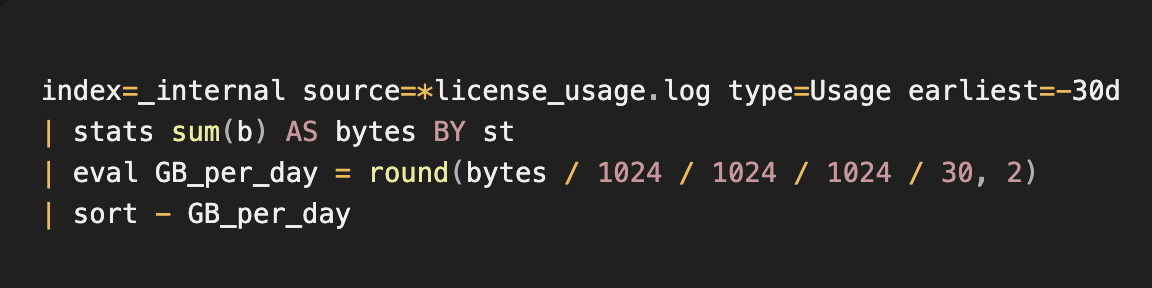
Run it where the license manager's _internal data is searchable. In large environments Splunk may squash host and sourcetype values in this log, so part of the volume can show up with an empty st.
For the second list, go through your enabled detection rules and the dashboards people actually use, and note which indexes and sourcetypes each one reads. Rules built on data models or macros take an extra step, because you have to trace each data model back to the sourcetypes that feed it.
Put the two lists side by side. Most of the waste falls into these patterns:
- High-volume sources that no detection rule, dashboard or report touches.
- Verbose sources where rules only read a few fields, such as firewall or DNS logs with dozens of unused fields per event.
- Duplicate events, where the same activity arrives from two collectors or two log formats.
- Noise such as health checks, heartbeat messages and debug-level application logs.
Other SIEMs have equivalents. Microsoft Sentinel shows billable volume per table in the Usage table, and most platforms can export the list of active rules.
Add up the volume in those buckets and divide it by your total daily ingest. That percentage is worth putting in front of your CFO, because it shows you found the waste yourself.
What we see in practice
When we look at ingest data with customers and prospects at Fleak, the same pattern comes up almost every time: a handful of sources make up most of the volume. The long tail of smaller sources barely moves the total. So we start with the top five sources by volume and leave the rest for later, because that's where the money is.
The other thing we see is a bill that jumps for reasons unrelated to the business. When we trace it back, the cause is a change in how data is collected, such as an agent configuration that was reset or overwritten and started forwarding far more than before. Nobody decided to send more data, but the SIEM billed for it anyway. Comparing a per-source breakdown with history is usually enough to find it.
Translate security metrics into financial ones
The pressure doesn't go away once the SIEM is well tuned. We hear this from customers even after their SIEM has been cleaned up and tuned: the business asks why it's paying for something that never seems to do anything. A quiet SIEM looks like a wasted one unless you report what it covers.
Rewrite each number you usually report so it answers a finance question.
|
Instead of |
Try |
|---|---|
|
"We ingest 2 TB of logs a day." |
"$X of our SIEM spend goes to sources that feed detections. We moved the rest to cheaper storage." |
|
"We need visibility across all sources." |
"These sources feed our detections. Everything else goes to cheap storage." |
|
"Log volume grew 40% this year." |
"Data grew 40%, SIEM spend grew much less, because we filter before ingest." |
|
"We generated 50,000 alerts." |
"We investigated N real alerts, and noise is down since last quarter." |
|
"We have to keep everything for compliance." |
"Compliance data is in object storage and we can replay it. Nothing was deleted." |
|
"Without this we'd be blind." |
"An incident like this costs a company our size around $X. This control costs $Y a year." |
Some of these are worth tracking every quarter.
Cost per detection is total SIEM spend divided by the number of rules that fired at least once in the period. It drops as you cut waste, but it's easy to game. Adding noisy, low-value rules improves it, and a rule for a rare, high-impact attack that didn't fire this quarter doesn't count at all. Use it to track the trend over time, not to decide which rules or data are worth keeping.
Growth decoupling compares the growth rate of SIEM spend with the growth rate of raw log volume. If the two lines rise together, your costs are on autopilot. A widening gap between them is proof that you're managing the spend.
Expected loss is the likely cost of an incident times its estimated yearly probability. To claim a control reduces risk, compare expected loss with and without it, and explain why the probability or the impact changes. Not every security leader wants dollar figures here. Some security leaders find that FAIR-style dollar estimates work well with their boards. Others prefer to describe business impact, such as how much service delivery is affected and how long recovery takes, because a dollar figure tends to get separated from its assumptions. Use whichever form your CFO and board already work with.
Cut the waste before you ask for more
Walking in with savings you've already found makes a request for new money easier to discuss. You can lower SIEM cost without losing coverage by changing what happens to data before it's stored.
Filter and trim data before it reaches the SIEM
Drop events no rule uses, such as health checks and debug logs. Remove fields your detections never read. Remove duplicates. Aggregate high-frequency, low-value events (for example, 1,000 identical allowed connections become one summary record with a count).
This works on data in motion, so the SIEM never sees and never bills for the removed volume. The main risk is dropping something an analyst will need later, which is why the next step matters.
Often the event is worth keeping and only its format is wasteful. We see this often with audit logs: customers want to keep every storage and SQL audit read and write event, and strip only the metrics, header sizes and durations that added bulk. Two practical problems usually come up. Events of the same sourcetype often vary slightly in format, so one regex won't match them all. And removing empty or null fields can break searches and apps that check for those fields. Test trimming rules against real samples, and check what depends on a field before you drop it.
Route data by value
Send data that feeds detections to the SIEM. Send everything else, including compliance and audit data, to low-cost storage such as S3, Azure Blob or a data lakehouse. When an investigation needs that data, replay it into the SIEM for the time window you care about.
This is the worry we hear most from customers: if we stop sending this data to the SIEM, do we lose detections? Your CFO will ask the same thing, and the honest answer has some detail in it. Keeping data is different from keeping real-time detection on it. In Microsoft Sentinel, for example, data that goes only to the Data Lake tier can't be used by analytics rules, so sources that need real-time detection have to stay in the Analytics tier. Moving data to a cheaper tier can cut costs a lot, but some detection capability and speed go with it. Tell your CFO which detections stay the same, which analysis becomes slower, and how long an investigator waits to pull archived data. Treat compliance retention the same way: find out where each requirement comes from, which data it covers, and whether it needs fast search or only storage.
Run some detections in the stream
Some detection logic can run on data while it moves through the pipeline, before it's stored anywhere. Simple pattern matches, threshold rules and known-bad indicator lookups are good candidates. The matching events and alerts go to the SIEM. The raw stream behind them can go to cheap storage.
This reduces how much data you need to keep in the SIEM just so a rule can scan it.
How much each change saves depends on your data mix, so give your CFO a range and write down the assumptions behind it.
Where a security data pipeline fits
Filtering, routing and in-stream detection all happen in the same place: between your log sources and your SIEM. That layer is called a security data pipeline. It collects data from your sources, processes it in flight, and sends each piece to the destination that fits its value.
Fleak is a data pipeline for this layer. You connect your sources once and decide what happens to the data on its way to Splunk or other destinations. Filtering and routing are where most teams start. Fleak can also run detection rules on the data while it moves, so the SIEM can receive alerts and the events behind them instead of the full raw stream.
A pipeline is also a cost, so put it in the same math. It pays off when the SIEM spend it removes is larger than what it costs to run, and the audit above will show you whether that's true for your environment.
Compare the pipeline with what you can already do, too. Splunk props and transforms can drop and trim data, and Microsoft Sentinel has its own optimization recommendations and can split data between tiers. Built-in tools often get you part of the way, so the real question is how much a pipeline adds on top of them. Your CFO will want to know what an extra tool adds over the built-in options, so measure both on your own top sources before you buy. Fleak sits in front of the SIEM you already run, so your rules, dashboards and analyst workflows stay where they are.
If you want help running the audit from this post on your own SIEM, get in touch with us.
The one-page brief for your CFO meeting
Keep it to one page, with the numbers at the top.
- Current spend and trend. Annual SIEM cost for the last two or three years, next to log volume for the same years.
- Waste found and removed. What you cut, how much it saved per year, and proof that nothing needed for detection or compliance was lost.
- What the remaining spend buys. Cost per detection, the attack techniques you cover, and alerts investigated per quarter.
- Risk reduced. For the two or three incident types your controls address most directly, an expected-loss estimate or a description of business impact, whichever your board already uses.
- The ask. The new money you need, what it pays for, and which metric in point 3 or 4 it will move.
- Twelve-month forecast. Expected SIEM cost in three cases: nothing changes, you use the SIEM's own optimization features, and you add a pipeline (including what it costs to run).