In August, Splunk made its Machine Data Lake generally available on Splunk Cloud Platform. It gives Splunk customers a Splunk-managed place to keep full-fidelity machine data in low-cost object storage, without indexing every event at ingest. A month later, Splunk paired it with activity-based pricing, which defers indexing charges until data is actually searched.
For a lot of security teams, that sounds familiar. It's similar to the job Cribl Lake has been doing for them: catch the bulk telemetry before it hits the SIEM, keep it cheaply, and replay it into Splunk when an investigation needs it. Now that Splunk offers a native version of the same pattern, many teams are asking whether to consolidate, and if so, how to move years of historical data without breaking the detections that depend on it.
The short answer: the migration is mostly a data-shape problem, not a storage problem. If the events that land in Splunk keep the same timestamps, sourcetypes, and raw format your detections were written against, they keep working. If they don't, detections fail quietly, which is the worst way for them to fail. Here's what changes and how to plan around it.
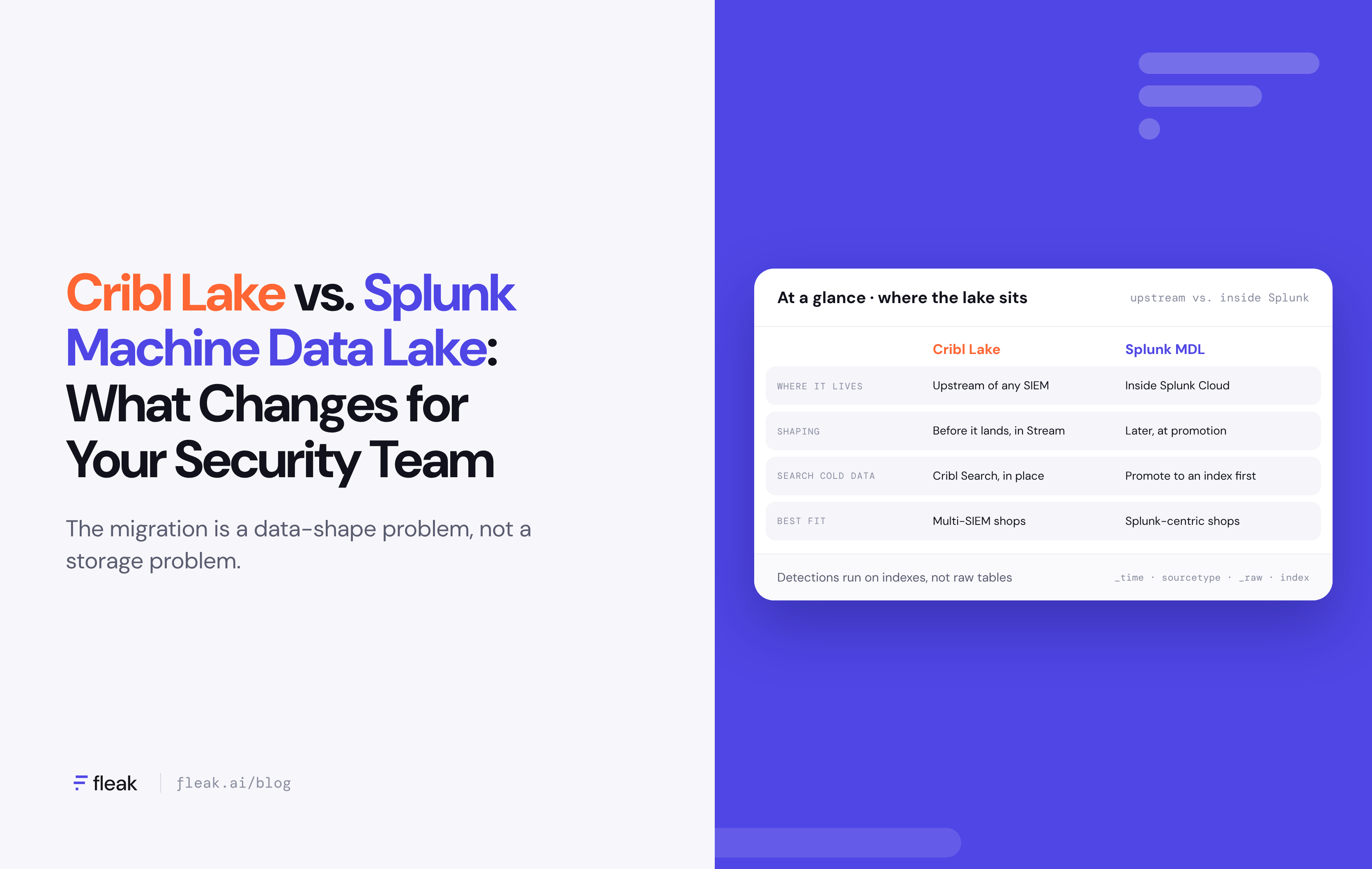
Cribl Lake vs. Splunk Machine Data Lake at a glance
Both products do the same basic job: keep full-fidelity telemetry in cheap object storage and make it searchable later. The difference is where they sit. Cribl Lake is vendor-neutral and sits upstream of any SIEM. Machine Data Lake sits inside Splunk Cloud, and its whole design assumes the data will eventually be promoted into Splunk.
|
Category |
Cribl Lake |
Splunk Machine Data Lake |
|---|---|---|
|
Where it lives |
Cribl Cloud, Cribl-managed or bring-your-own storage |
Inside Splunk Cloud Platform (10.5 and later), Splunk-managed |
|
Storage format |
Gzip-compressed JSON (with _raw), Parquet, or DDSS |
"Raw table" with a Splunk-managed schema; analytics tables use Iceberg |
|
How data gets in |
Cribl Stream routes, or Direct Access over HTTP (including Splunk HEC format) |
Universal/Heavy Forwarder, HEC token pointed at a raw table, or a landing definition on data already reaching Splunk Cloud |
|
How you search it |
Cribl Search, in place |
Catalog for discovery; promote to an index or analytics table for real investigation |
|
Getting data back into Splunk |
Replay through Cribl Stream to a Splunk destination |
Static promotion (historical range) or streaming promotion (new events only) |
|
Pricing model |
0.05 credits/GB stored (Cribl-managed), 0.02 credits/GB (BYOS), billed on compressed data |
Not published; tied to Splunk's activity-based pricing in controlled availability |
|
Best fit |
Multi-SIEM or SIEM-agnostic shops; heavy reduction and routing |
Splunk-centric shops that want one vendor and one console |
Sources: Cribl Lake, About Cribl Lake, Splunk: Choose how to route data to Machine Data Lake, Splunk Lantern: Onboarding and promoting data.
What changes for your security team
The storage tier is the easy part to swap. What your analysts and detection engineers will actually feel is everything around it.
- Where shaping happens. With Cribl Lake, most teams reduce, enrich, and reformat data in Cribl Stream before it lands. With Machine Data Lake, the raw table "preserves the raw event with limited metadata," and shaping happens later, at promotion or in Edge/Ingest Processor pipelines. That's a different mental model: you keep more of the original event, but you also have to decide what to do with it later.
- How you search cold data. Cribl Search lets analysts query data in place. In Machine Data Lake, the Catalog helps you find and preview data, but Splunk positions raw tables for "broad retention and bounded exploration," not repeated interactive investigation. For real hunting, you promote data into an index or an Iceberg-backed analytics table first.
- What your detections can see. Enterprise Security correlation searches, data model acceleration, and alerting run against indexes. Data that only lives in a raw table is invisible to them. Your index tier still needs to hold the "active window" your ES content depends on, so plan index retention around your longest detection lookback.
- How promotion maps to your index layout. As of the August 2026 release, static promotion goes into a new index or analytics table, not an existing one. If your detections reference specific index names, directly or through macros, you'll need to update them.
- How you think about cost. Cribl Lake bills on compressed GB stored. Splunk hasn't published Machine Data Lake rates yet, and activity-based pricing charges when data is searched. That makes promotion and search habits a budget line, so it's worth deciding up front which historical ranges you actually need promoted.
How to migrate historical data from Cribl Lake to Splunk Machine Data Lake without losing detections
The safe path is to replay history out of Cribl Lake in the exact shape your Splunk detections expect, land it in a Machine Data Lake raw table, and promote only the time window your detections actually need.
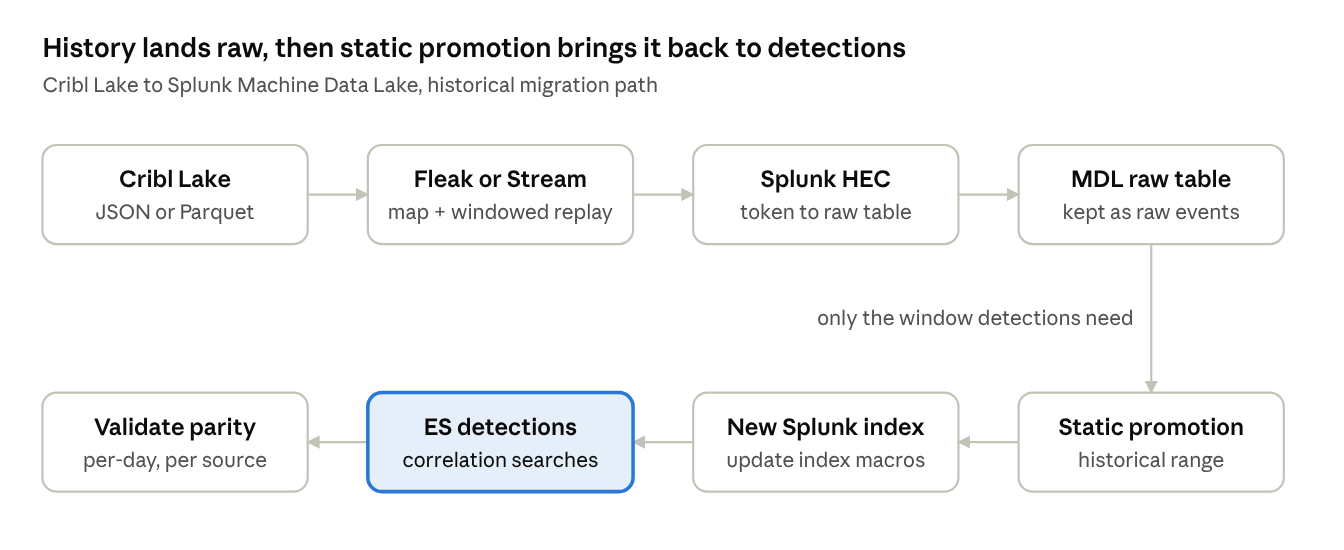
You can build that yourself in Cribl Stream, or use a migration tool like Fleak, which reads your Cribl Lake data, maps it to Splunk metadata, replays it over HEC, and checks parity as part of the job. The steps are the same either way; what changes is how much of it your team does by hand.
Here's how that breaks down in practice.
- Inventory what your detections depend on. Before touching any data, list every correlation search, saved search, and data model your team relies on. For each one, note the index, sourcetype, key fields, and lookback window. This becomes your parity checklist, and it tells you how much history really needs to come back as indexed data versus staying in the lake.
- Check how and where the data is stored in Cribl Lake. Teams often reduced or reshaped events in Cribl Stream before they landed: dropped fields, rewrote _raw, converted to JSON or Parquet. Splunk add-ons parse by sourcetype and expect the original raw format, so note which datasets still hold the original _raw. Also check your storage model. Fleak can read bring-your-own-storage Cribl Lake buckets directly; if your lake is Cribl-managed, Cribl replays the data to Fleak instead, and Cribl Stream stays in place until that replay finishes.
- Map each dataset to Splunk metadata. Every event needs the sourcetype, source, host, and index your detections were written against, with the original _raw intact. Fleak sets these per event during the migration, and for sources Cribl reshaped, its AI mapping can generate a parser from a few sample events instead of you hand-writing regex.
- Preserve event time explicitly. Send each event's original timestamp in the HEC time field. If it's missing, Splunk stamps events with the arrival time, and a year of history collapses into one afternoon. Fleak handles this time restoration as part of the replay, but it's worth spot-checking either way.
- Set up the raw table and HEC tokens. On the Splunk side, create the Machine Data Lake raw table and point an HEC token at its resource name. Keep this route separate from your live production ingest, so a replay mistake can't pollute live indexes.
- Move live sources one at a time. Before you replay any history, cut over new data source by source. Fleak runs its pipelines side by side with Cribl Stream, so you can compare output for each source before you switch it over.
- Replay history in time windows, then promote what detections need. Replay over HEC a day or a week at a time, with backpressure so the backfill doesn't crowd out live traffic. Then use static promotion for the range that matches your longest lookback (for example, 90 days of authentication logs for a brute-force detection). Everything older can stay in the lake. Streaming promotion only covers new events, so pair it with a static promotion if you need both.
- Repoint index references. Static promotion currently creates a new index rather than writing into an existing one. Update your index macros, data model constraints, and ES configuration to include the new index, then rebuild data model acceleration over the promoted range.
- Cut over on per-day parity. Compare event counts per sourcetype per day between Cribl Lake and Splunk, and backtest your key detections over a known period to confirm they produce the same notable events. Fleak runs the per-day parity checks as part of the migration. Keep Cribl Lake read-only until both checks pass.
Common pitfalls that break detections during migration
Most detection gaps after a migration don't come from lost data. They come from data that arrived looking slightly different than it used to. A few to watch for:
- Reduced events that never get rebuilt. If Cribl Stream dropped fields to save on storage, those fields are gone. Detections that filter on them won't error out; they'll just stop matching.
- Sourcetype drift. A replayed event tagged cribl:json instead of WinEventLog:Security skips the add-on that maps it to CIM, so it never shows up in the Authentication or Endpoint data models.
- Timestamps set at arrival. Without the original event time, history piles up on the replay date. Lookback windows miss it, and in a live index it can even trigger alerts on years-old activity.
- Duplicates from overlapping replays. Re-running a batch that partially succeeded doubles your events, which throws off any threshold-based detection. Track which time ranges you've already replayed.
- Index names hardcoded in searches. Promotion creates new indexes, and a detection that says index=wineventlog won't look anywhere else. Search your saved searches for hardcoded index names before cutover.
- Normalization nobody wrote down. If Cribl pipelines were quietly renaming fields or mapping to a schema like CIM or OCSF, that logic has to move somewhere, whether that's Edge Processor, Ingest Processor, or another pipeline layer. Otherwise every source that depended on it degrades at once, and it's much easier to move that logic if it lives in a portable, documented schema rather than inside one vendor's pipeline config.
The common thread is that detections are only as reliable as the consistency of the data underneath them. A migration is a good moment to write down what your schema actually is, not just what you assume it is.
How Fleak helps with the migration
You can do every step above in Cribl. The real difference is how much you build by hand, and how long you keep paying for Cribl while you do it. Fleak is an AI-native data pipeline platform, and for this kind of move it takes the repetitive parts off your team's plate:
- Direct reads from your lake. Fleak reads bring-your-own-storage Cribl Lake buckets directly, so you don't need Cribl in the loop to get history out. Cribl-managed lakes are the exception: Cribl replays to Fleak until the history is moved.
- Splunk-ready events. Fleak sets source, sourcetype, host, and index on every event, keeps the original _raw, and restores original timestamps, which covers the most common ways detections break.
- Controlled replay. History goes over HEC in time windows, with backpressure so a backfill doesn't compete with live traffic.
- Side-by-side testing. New pipelines run alongside Cribl Stream, so you can compare output per source before cutover.
- Built-in parity checks. Per-day parity checks run as part of the migration, not as a separate project at the end.
- Drift repair. When a source's format changes mid-migration, Fleak detects it and repairs the mapping, typically in under three minutes.
For the mechanics in more detail, including a sample routing config, see our step-by-step guide to moving Cribl Lake history into Splunk Machine Data Lake.
FAQ
Can I run Splunk detections directly against Machine Data Lake?
Not in the way most teams mean it. Enterprise Security correlation searches, data model acceleration, and alerting run on indexes. Data in a raw table needs to be promoted to an index first. Iceberg-backed analytics tables are aimed at scheduled hunting and compliance reporting rather than real-time alerting.
Do I need to migrate all of my Cribl Lake history?
Usually not. Promote the window your detections look back over, and keep the rest in the lake for investigations and compliance. If you're on Cribl Lake's bring-your-own-storage option, you can also leave older data where it is and only move what's still useful.
Can Cribl Stream send directly into Machine Data Lake?
Splunk documents three ways into a raw table: a forwarder input, an HEC token that targets the raw table, or a landing definition on data already reaching Splunk Cloud. Cribl Stream's Splunk HEC destination, pointed at a raw-table HEC token, fits the second route. Test it with a small batch before running a full replay.
Will streaming promotion backfill my history?
No. Streaming promotion only applies to new matching events. For historical data, run a separate static promotion over the time range you need.
Should we keep Cribl if we move to Machine Data Lake?
It depends on your environment. If you send data to more than one SIEM or analytics tool, a vendor-neutral pipeline layer is still useful. If Splunk is your only destination, Edge Processor and Ingest Processor may cover most of what you need.
The bottom line
Moving from Cribl Lake to Splunk Machine Data Lake is less about where your data sits and more about whether it still looks the way your detections expect when it lands. Treat timestamps, sourcetypes, raw format, and index references as part of the migration scope, not cleanup for later, and validate parity before you retire anything.
If you're planning a move like this, the best first step is finding out what your detections actually read before you replay anything. Fleak offers a log volume cost audit that does exactly that, and it's a low-effort way to size the migration before you commit to it.
Sources
- Splunk: From Data at Rest to Data in Action: Machine Data Lake and Catalog
- Splunk: New Splunk Platform Innovations Supporting Cisco Data Fabric Are Generally Available (Aug. 4, 2026)
- Splunk: Announcing Splunk Cloud Platform 10.6 and Splunk Enterprise 10.6
- Splunk Docs: Choose how to route data to Machine Data Lake
- Splunk Docs: Get started with Machine Data Lake
- Splunk Lantern: Onboarding and promoting data with Cisco Data Fabric
- TechTarget: Seismic shift in Splunk pricing spotlights AI data management (Sept. 18, 2026)
- Cribl Lake product page
- Cribl Docs: About Cribl Lake
- Cribl: Master telemetry replay with Cribl Stream and Cribl Lake
- Fleak: Moving Cribl Lake history to Splunk Machine Data Lake