During my time at Splunk and Netflix, I spent a lot of time building infrastructure for log processing at scale. Ingestion was rarely the bottleneck. The real nightmare was always normalization.
On top of the high volume, you are dealing with a chaotic mix of formats. Every vendor emits logs in a unique dialect—Cisco uses unstructured text, Linux uses Syslog, web servers use CLF or JSON.
For a security engineer, the goal is detection. But detection is impossible if you can't read the underlying data structure. Our approach is fixing the schema mismatch problem by normalizing diverse log sources into the Open Cybersecurity Schema Framework (OCSF) using Fleak.
The Data Heterogeneity Problem
Take a typical lateral movement scenario. An attacker scans the perimeter, brute-forces a database, and then pivots to an internal web API. The infrastructure logs tell the story, but they do so in different languages.
1. The Perimeter (Cisco IOS)
SEC-6-IPACCESSLOGP: list ACL_IN denied tcp 192.168.1.105(59321) -> 10.0.0.1(445), 1 packet
The router uses the keyword denied to indicate a block.
2. The Host (Linux Auth)
Failed password for invalid user admin from 192.168.1.105 port 55601 ssh2Accepted password for postgres from 192.168.1.105 port 55604 ssh2
The Linux server, however, logs a Failed password followed by an Accepted password event.
3. The Application (Apache)
10.0.0.50 - - [02/Jan/2026:14:15:35 -0800] "POST /api/v1/login HTTP/1.1" 500 489 "-" "curl/7.64.1"
The web server is even more cryptic, communicating its failure numerically with a status code 500.
To a human, the story is obvious. But to a machine, these are just incompatible strings. Cisco says denied, Linux says Failed, and Apache says 500.
Most teams try to patch this hole by maintaining massive libraries of Regex parsers. It creates a mountain of technical debt. A vendor updates a firmware version, the log format shifts slightly, the pipeline breaks, and an engineer loses an afternoon patching the parser.
The Architecture: Decoupling Definition from Execution
We built Fleak to solve this by separating the logic of the transformation from the execution of the pipeline. You can think of it as a "Brain" and "Muscle" architecture.
1. The Brain: Automated Schema Mapping
The hard part is the semantics—figuring out how specific vendor fields map to the OCSF standard. But before we can map data, we have to structure it.
We start by defining the parsing logic. The system extracts the raw logs into a structured JSON format. Once structured, we feed the logs into the Fleak OCSF Mapping App. The app analyzes the logs and suggests the specific OCSF mapping logic.
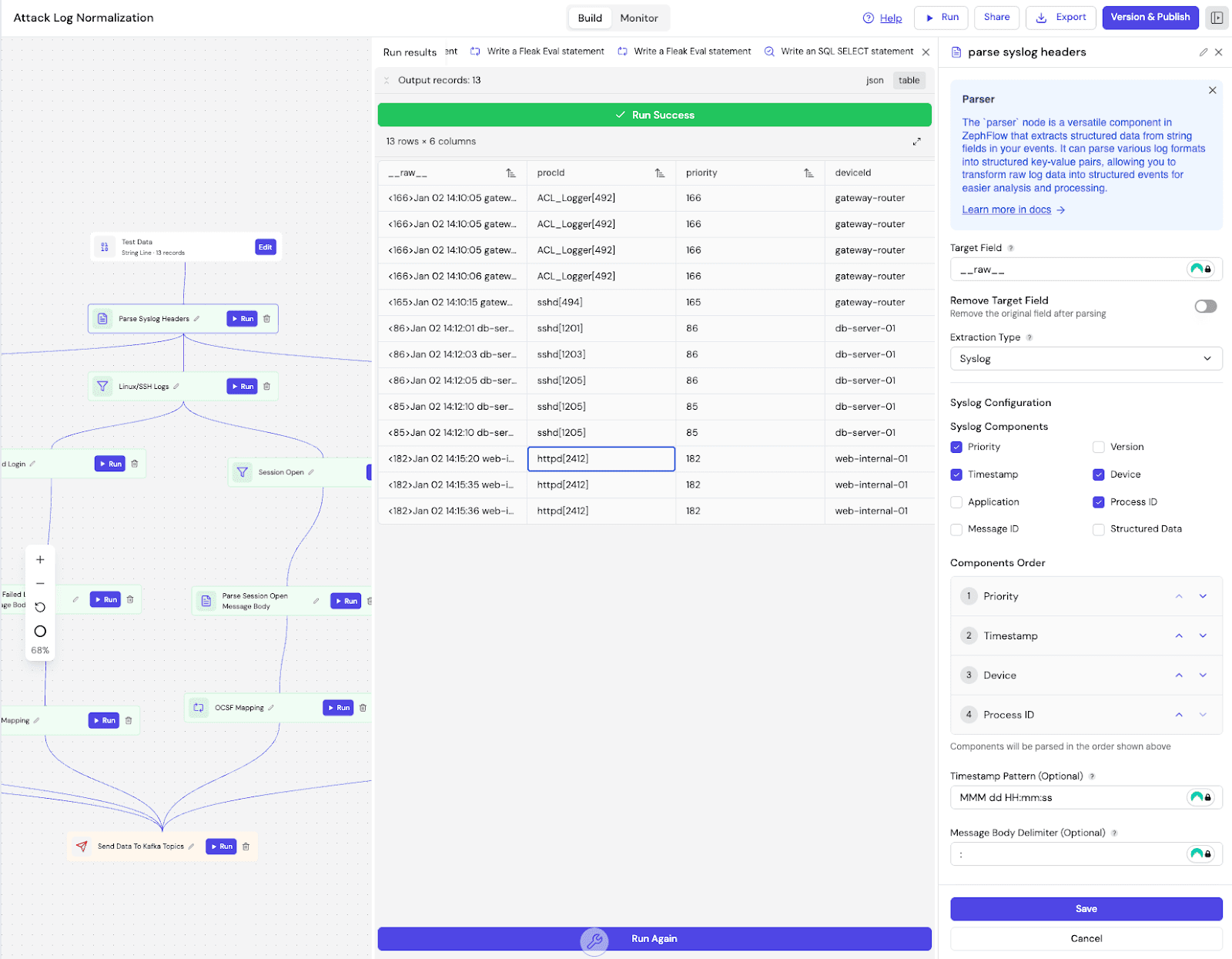
For this specific attack path, the AI generated specific rules for each log type. It mapped the extracted Cisco action denied to the OCSF Refuse activity (ID 5). For the SSH logs, it parsed the auth_result string to map "Failed" attempts to SSH Activity: Fail (Class UID 4007). And for the web traffic, it translated the Apache status code 500 into a generic OCSF Status: Failure.
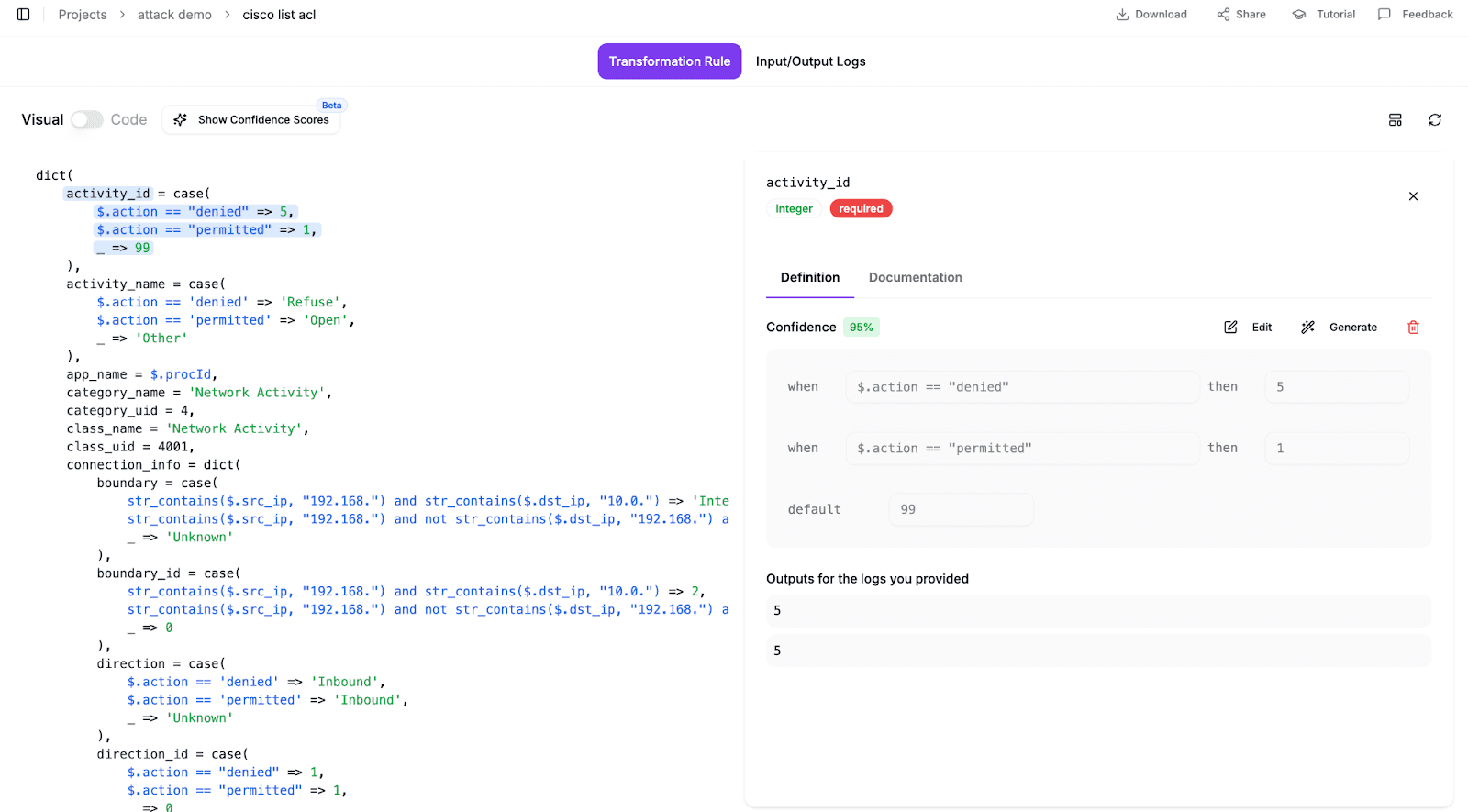
This approach keeps things maintainable. You define the parsing logic once, and the AI handles the complex semantic translation. So different failure signals all look the same, without you manually looking up OCSF codes.
2. The Muscle: Zephflow Execution
Mapping rules don't matter if you can't run them at scale. Once the parsing configuration and mapping rules are defined, they need to be executed efficiently. To run this, we use Zephflow, our open source processing engine.
We build the entire pipeline directly inside Fleak's visual DAG Builder. This environment configures the parsing logic to structure the raw logs, sets up routing filters, and applies the AI-generated mapping rules using evaluation nodes.
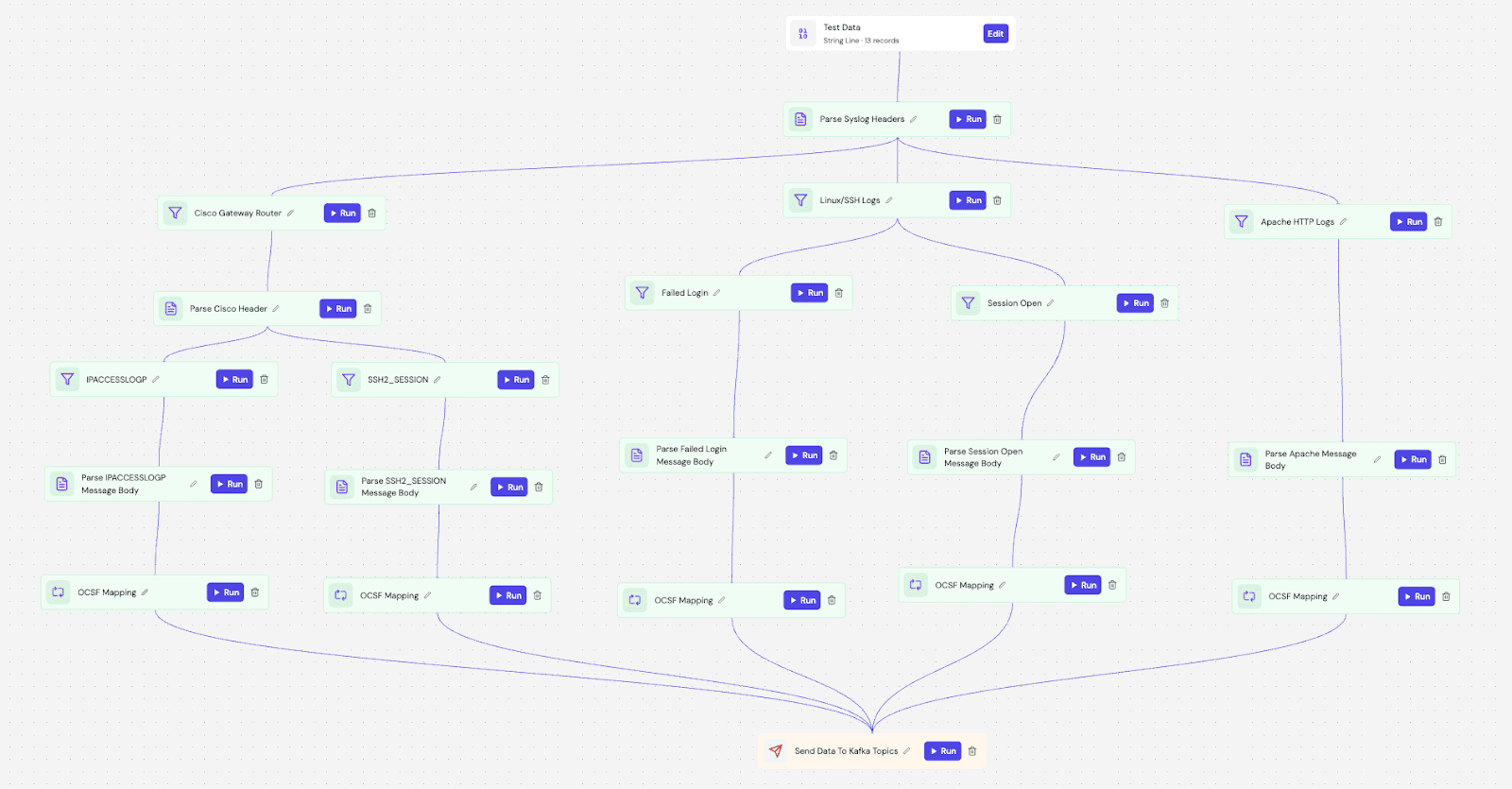
Zephflow acts as an intelligent router here. An event enters the DAG and follows a processing sequence tailored to its source. It inspects the deviceId to determine the route—sending gateway logs to the Cisco parser, database logs to the SSH parser, and web traffic to the Apache parser.
Once routed, the event is parsed from raw text into structured keys and immediately passed to an evaluation node. The AI-generated mapping rules normalize the fields in real-time. For example, with the web logs, the pipeline extracts the user-agent curl/7.64.1 and status code 500, then maps in real-time into the corresponding OCSF fields for "Network Activity."
The Result: Identifying the Pivot
With the data normalized into OCSF, the detection logic gets a lot simpler. We don't need to query specific source indices or handle vendor-specific fields anymore.

By querying for Network Activity across all sources, the attack path becomes clear. We see the external IP 192.168.1.105 first attempting to scan the router and getting blocked. Moments later, that same IP successfully authenticates into the internal database. Then, the database (10.0.0.50) itself starts scanning the internal web server.
Without normalization, the jump from the database to the web server is obscured because the Source IP changed. With Fleak, the continuity of "Malicious Network Activity" reveals the lateral movement.
Conclusion
We shouldn't still be writing regex parsers by hand. It's a waste of engineering talent. We built Fleak to automate the boring parts of security data so you can get back to actual detection engineering.
You can generate your mappings with the Fleak OCSF Mapper and run your pipelines efficiently with Zephflow.